Negative feedback hits harder than most sellers expect. Beyond the visible star drop on your seller profile, it directly feeds into your Order Defect Rate, and if that rate climbs above 1%, Amazon starts sending warnings that can eventually lead to account suspension. The good news is that not all negative feedback has to stay. Amazon has clear, specific categories where feedback violates its own policies, and removing those is often a fast, straightforward process once you know exactly where to look.
This guide covers the current process for requesting feedback removal, the exact categories Amazon will act on, what to do when an automated request gets denied, and the difference between seller feedback and product reviews, since they are handled through completely separate systems.
Table of Contents
- Seller Feedback vs Product Reviews: Know the Difference
- What Feedback Actually Qualifies for Removal
- Step-by-Step: Requesting Removal in Feedback Manager
- If the Automated Request Gets Denied
- The 90-Day Window
- What Not to Do When Contacting a Buyer
- Why This Matters Beyond Your Feedback Score
- Preventing Negative Feedback Going Forward
Seller Feedback vs Product Reviews: Know the Difference
Before requesting anything, confirm which system the negative comment actually lives in, since Amazon treats these as entirely separate and the removal process is different for each.
Seller feedback rates your performance as a seller, covering things like shipping speed, packaging condition, communication, and how accurately the listing matched what arrived. This is what shows up on your seller profile and feeds into your account health metrics.
Product reviews rate the product itself, covering quality, usability, and whether it performed as expected. These appear on the product detail page, not your seller profile, and they are much harder to get removed since they fall under a different policy framework entirely.
A common and costly mistake is trying to remove a product review through the seller feedback removal process, or vice versa. They are reviewed by different systems and a request submitted to the wrong one simply will not go anywhere.
What Feedback Actually Qualifies for Removal
Amazon will not remove feedback simply because it is negative or because you disagree with it. Removal only happens when the feedback violates a specific policy. The clearest, fastest-approved categories are:
- It is actually a product review, not seller feedback. If the comment is entirely about the product’s quality rather than your service as a seller, it does not belong on your feedback page.
- It contains obscene language or profanity.
- It reveals personal information, such as a name, phone number, or address belonging to the buyer or anyone else.
- It relates to an order fulfilled by Amazon (FBA) where the complaint is entirely about shipping, delivery, or packaging handled by Amazon itself, not by you.
- It includes seller-targeted abuse or harassment unrelated to the actual transaction.

If your feedback genuinely falls into one of these categories, the removal request is usually fast, sometimes resolved within hours if the violation is clear-cut to Amazon’s automated system. If it does not fall into one of these categories, for example a buyer who was simply unhappy with how long FBM shipping took, Amazon will not force a removal, and your options shift toward direct buyer communication instead.
Step-by-Step: Requesting Removal in Feedback Manager
- Log in to Amazon Seller Central.
- Hover over the Performance tab and click Feedback, which opens Feedback Manager.
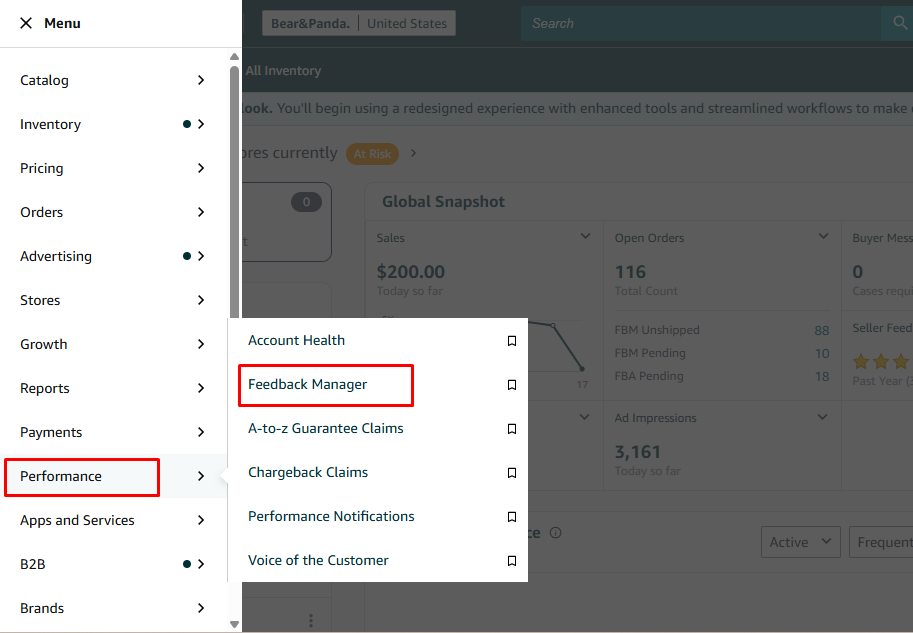
- Locate the specific negative feedback entry you want to address.
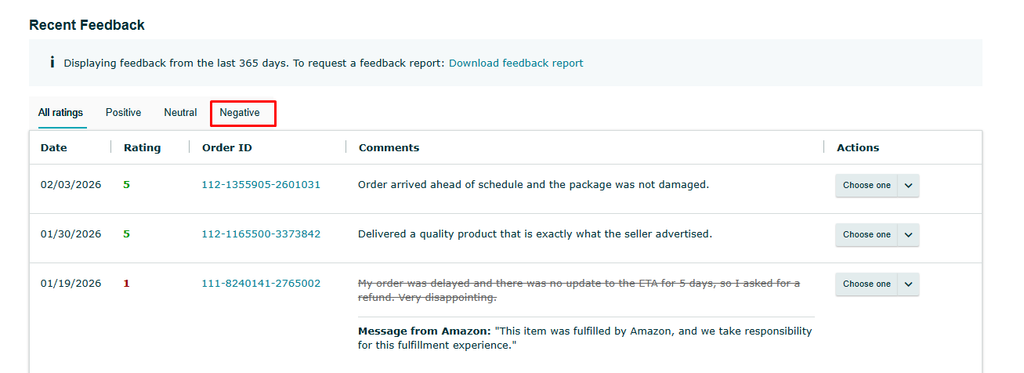
- Click the dropdown next to that entry and select Request Removal.
- Amazon will typically ask you to confirm the specific reason, such as whether the feedback contains inappropriate content, personal information, or relates to an FBA order. Select the option that genuinely matches the situation.
- Submit the request.
If the violation is clear, this is often resolved automatically within minutes to a few hours. If it requires manual review by an Amazon employee, expect anywhere from a few hours to a couple of days, and occasionally longer if the case needs additional investigation.
If the Automated Request Gets Denied
Sometimes the automated system rejects a removal request even when you believe the feedback genuinely violates policy. When this happens:
- Open a support case directly with Seller Support rather than resubmitting the same automated request repeatedly.
- Write a short, factual explanation referencing the specific policy category you believe applies (product review on a seller feedback page, an FBA fulfillment issue, obscenity, or personal information).
- Include any supporting evidence Amazon can verify: a screenshot of the feedback, the order ID, tracking information if relevant, or the exact wording of the comment.
- Keep the message direct and specific so a support agent can act on it quickly rather than having to ask follow-up questions.
- If a case closes without resolution, avoid immediately reopening the same case thread repeatedly. Wait briefly, then open a new case and restate the violation clearly in one paragraph.
The 90-Day Window
Submit your removal request within 90 days of the transaction date for the best chance of success. Amazon’s systems and support team are generally more responsive to requests made closer to when the order actually happened, since order details, tracking, and the original context are easier to verify. Waiting months to act on negative feedback reduces your chances, so check Feedback Manager regularly rather than only after you happen to notice a problem.

What Not to Do When Contacting a Buyer
If the feedback does not qualify for forced removal, your remaining option is contacting the buyer directly and hoping they choose to update it voluntarily. Amazon is strict about how this can be done, and getting it wrong risks a policy violation on your own account.
- Do not directly ask a buyer to remove or change their feedback. Amazon’s Terms of Service prohibit pressuring or instructing a buyer to alter feedback, even politely.
- Do not offer a refund, discount, or free product specifically in exchange for removing or changing feedback. This is treated as feedback manipulation and can result in account-level consequences far more serious than the original negative comment.
- Do lead with resolving their actual problem. Apologize for the experience, offer a standard remedy like a replacement or refund where appropriate, and make it easy for them to reach you.
- Do mention, after the issue is genuinely resolved, that they are welcome to update their feedback if they feel differently now, without making that the condition of the resolution.
A public reply is also available directly on the feedback itself. It does not change your feedback score or affect your Order Defect Rate, but it does let future customers see that you respond professionally and take issues seriously, which carries its own reputational value even when the original feedback stays up.
Why This Matters Beyond Your Feedback Score
Negative feedback is not just a number sitting on your profile. It feeds directly into your Order Defect Rate, one of the core metrics Amazon uses to evaluate account health. If your ODR climbs above 1%, Amazon issues warnings, and a sustained high ODR can lead to listing restrictions or, in serious cases, account suspension.
This is why acting on negative feedback quickly, both by requesting removal where it genuinely qualifies and by resolving the underlying buyer issue where it does not, matters well beyond reputation. It is directly tied to your ability to keep selling on the platform at all.
Preventing Negative Feedback Going Forward
The most effective long-term approach is reducing how often negative feedback happens in the first place.
- Keep listings accurate. A meaningful share of negative feedback traces back to a product or shipping expectation the listing did not set correctly.
- Monitor feedback patterns, not just individual comments. If multiple buyers mention the same specific complaint, that is a signal to fix the underlying listing, packaging, or fulfillment issue rather than just handling each comment individually.
- Respond quickly to buyer messages before a frustrated customer escalates straight to feedback instead of reaching out first.
- Use Amazon’s Request a Review feature to encourage satisfied buyers to share their experience, which naturally balances out the occasional negative comment with a healthier volume of positive ones.