Selling on Amazon becomes much more effective when product variations are structured correctly. A well-organized variation family creates a better shopping experience while helping consolidate reviews, improve product visibility, and increase conversion rates. In contrast, poorly structured variations can lead to duplicate listings, cluttered catalogs, and unnecessary management challenges. Getting the structure right from the start helps sellers build a cleaner, more scalable, and higher-performing Amazon catalog.
In this guide, we’ll explore the three main methods for adding and managing Amazon product variations, along with best practices for creating and maintaining effective parent-child relationships within your listings.
What Is a Variation Listing on Amazon?
Amazon Parent-Child Variation Listing
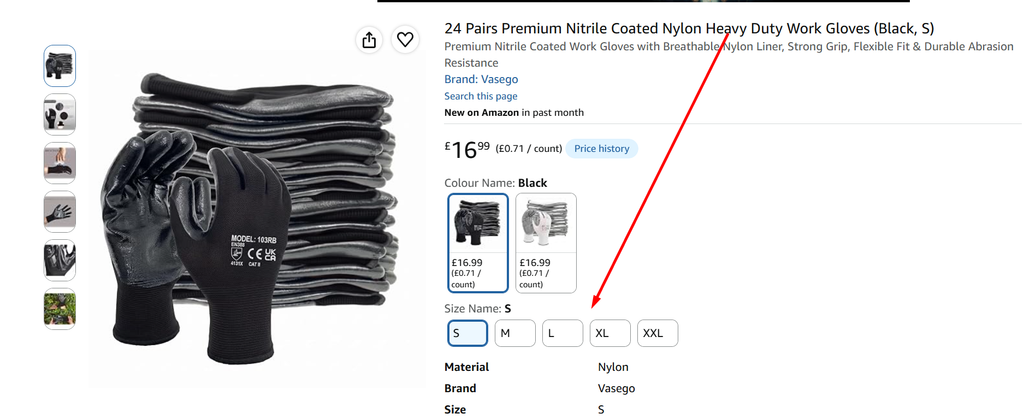
An Amazon variation listing, also known as a parent-child listing, allows sellers to group similar products under one main product listing.
For example, if a water bottle is available in 5 sizes (S,M,L,XL,XXL) and 2 colors (Black and White), all four options can be grouped under one parent listing instead of creating separate listings for each option.
How It Works
- Parent Listing: A non-buyable placeholder that groups all related product variations together.
- Child Listings: The individual, buyable products or SKUs, such as different sizes, colors, styles, or flavors.
Benefits of Variation Listings
1. Better Customer Experience
Customers can easily view and select different product options from a single listing.
2. Increased Visibility and Conversion
Having multiple options in one listing can improve customer engagement and create more opportunities for sales.
3. Review Consolidation
Eligible variations can share reviews within the same product family, helping build customer trust.
4. Easier Product Management
Sellers can manage related products within one organized parent-child structure instead of handling multiple separate listings.
5. Simplified Advertising
Grouping related products together can make advertising and promotional activities easier to manage.
Example Structure
Parent Listing
↓
- Child 1: Black– S,M,L,XL,XXL
- Child 2: White– S,M,L,XL,XXL
In Short
Amazon variation listings are designed to group related products into one organized product family, making it easier for customers to compare and choose products while helping sellers improve visibility, conversion, review performance, and product management.
Why Variations Matter on Amazon
Why Amazon Variation Setup Matters
One of the most overlooked aspects of Amazon catalog management is the variation setup. Many sellers either ignore variations completely or set them up incorrectly, which can result in scattered listings, a poor customer experience, and missed sales opportunities.
Variations allow customers to easily explore different sizes, colors, styles, or other product options from a single product page. Instead of searching for each option separately, shoppers can quickly compare available choices and select the product that best meets their needs.
A well-structured variation setup creates a smoother shopping experience, builds customer confidence, and can ultimately help improve conversion rates.
For brands, properly managed variations can also bring related products together under one parent listing, allowing eligible reviews to be consolidated within the product family. This can strengthen social proof and potentially support better organic performance.
Key Benefits of Well-Structured Variations
- Consolidate reviews across eligible variations
- Improve search relevance and click-through rates (CTR)
- Reduce catalog clutter by grouping related products
- Increase cross-selling opportunities by showing customers additional options
- Simplify advertising and campaign management
Why Proper Setup Matters
Setting up variations correctly from the beginning is important. Once products are established as separate listings, correcting, merging, or restructuring them later can be more complicated and may require additional catalog work.
In today’s competitive Amazon marketplace, variation optimization is not simply an optional feature—it is an important part of effective catalog management and long-term growth.
Method 1: Adding Variations to a New Listing
When launching a new product, it’s best to plan your variation structure from the beginning. Setting up the parent-child relationship during listing creation keeps the catalog organized and makes it easier to add new sizes, colors, or features later. This approach saves time, reduces the risk of listing complications, and creates a scalable structure for future growth. For private-label sellers, building variations correctly from the start provides a cleaner and more manageable catalog as the product line expands.
Steps to Add Variations in a New Listing:
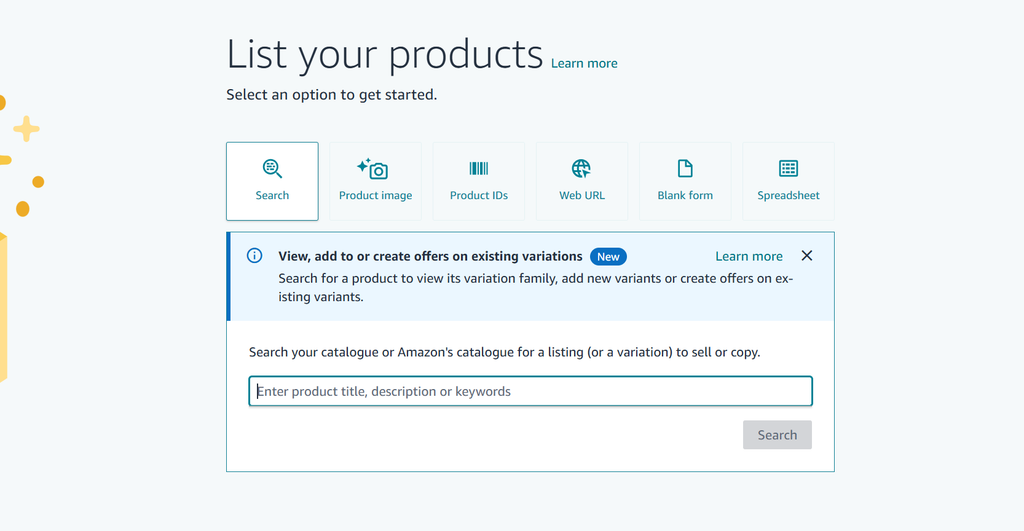
- Log in to Seller Central → Catalog → Add a Product.
- Select the option to create a listing from a blank form
- Fill in the required product details such as title, category, and item type keyword.
- Check the “Variation” box, even if variations are not yet planned. This ensures flexibility for future updates.
- Select variation attributes based on category (e.g., size, color, style).
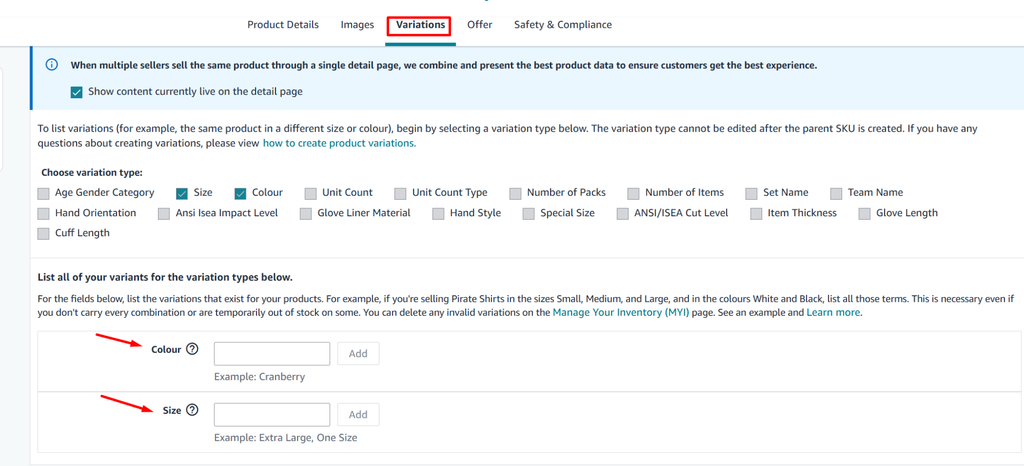
- Add variation details such as SKUs, UPCs/GTINs, prices, and product images for each child product.
- Submit the listing to finalize the parent-child relationship.
Pro Tip: Once a parent SKU is created, variation themes cannot be changed. Always choose the correct attributes (size, color, flavor, etc.) from the start.
Method 2: Adding Variations to an Existing Listing
Products often evolve after launch, with sellers adding new sizes, colors, flavors, or other options over time. When this happens, variations can be added to an existing active listing, allowing all related products to remain grouped under one parent listing instead of creating duplicates. This method is particularly useful for expanding product lines or introducing seasonal options. However, it requires careful setup, especially when the original listing was not created with variations in mind. When managed correctly, adding variations to an existing listing provides a practical way to expand the product range while keeping the catalog organized.
Steps to Add Variations to an Existing Listing:
- Navigate to the parent listing → Edit → Variation tab.
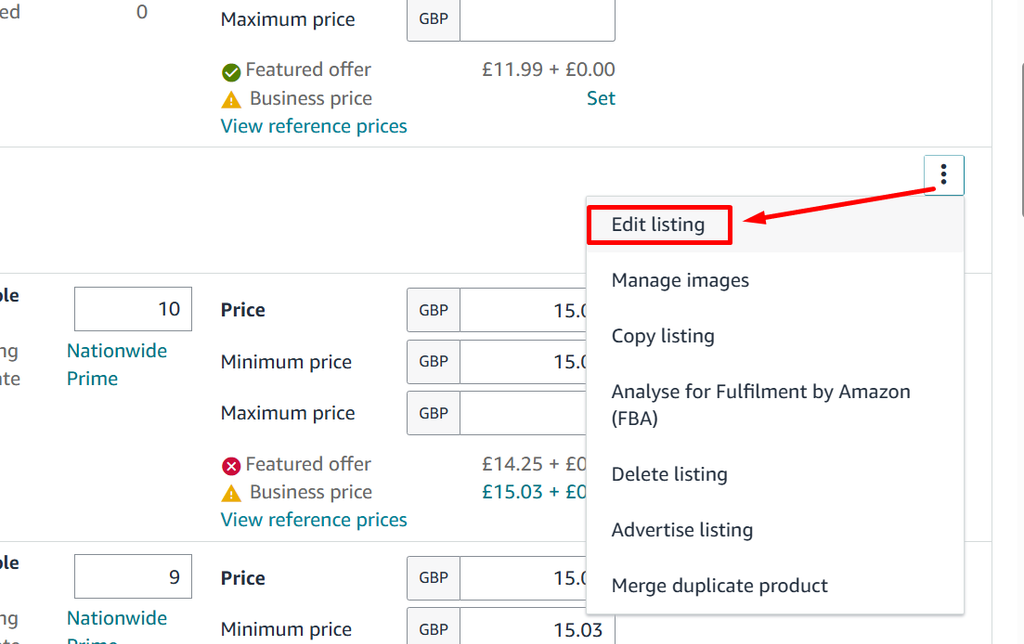
- Add the new variation attribute (e.g., a new size or color).
- Fill in required details such as condition, price, SKU, and barcode.
- Submit changes.
This method works well for adding new variations but can become messy if the listing was not initially created as a parent-child structure.
Method 3: Merging Standalone Listings Into a Variation Family
When multiple standalone listings exist for similar products, combining them into a single variation family can create a more organized and effective catalog. Instead of spreading traffic, reviews, and sales across separate listings, sellers can group related products under one parent listing, making it easier for customers to discover and compare different options. Although the process can be more complex than simply adding new variations, it is especially valuable for brands that expanded quickly and now need to restructure their catalog. When done correctly, a unified variation family can improve the customer experience, strengthen listing visibility, and support future growth.
There are three ways to do this:
Option 1: Add a Standalone Product to an Existing Parent Listing
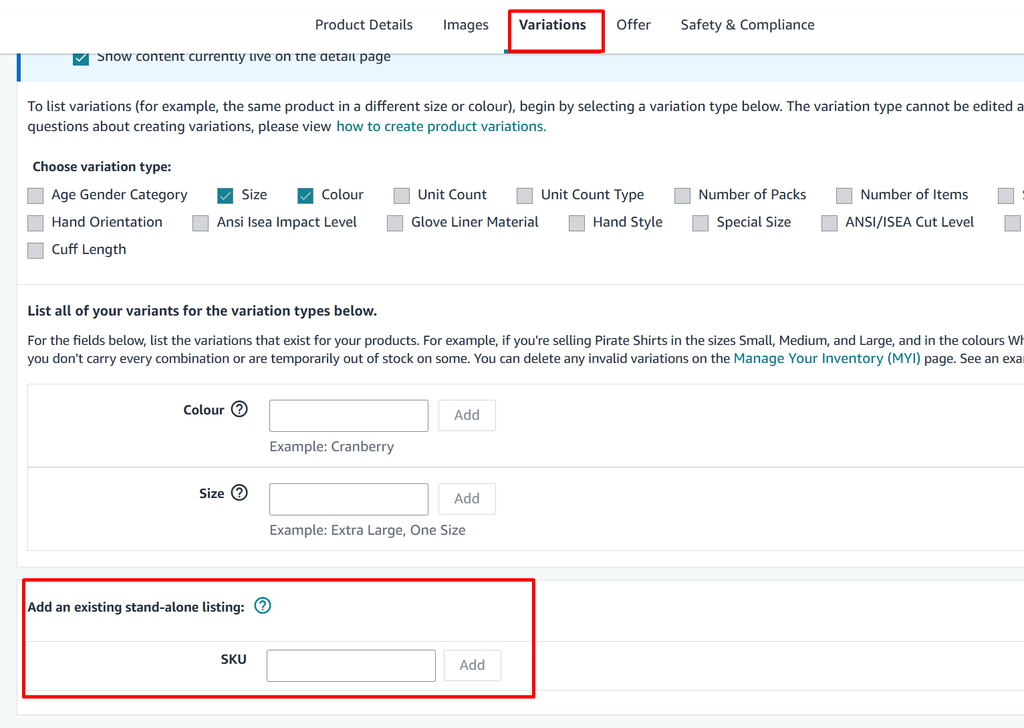
- Go to the parent listing and open the Variation tab.
- Enter the SKU of the standalone product under “Add existing listing”.
- Amazon merges the standalone product into the parent variation family.
Option 2: Use the Variation Wizard – Add to Existing Family
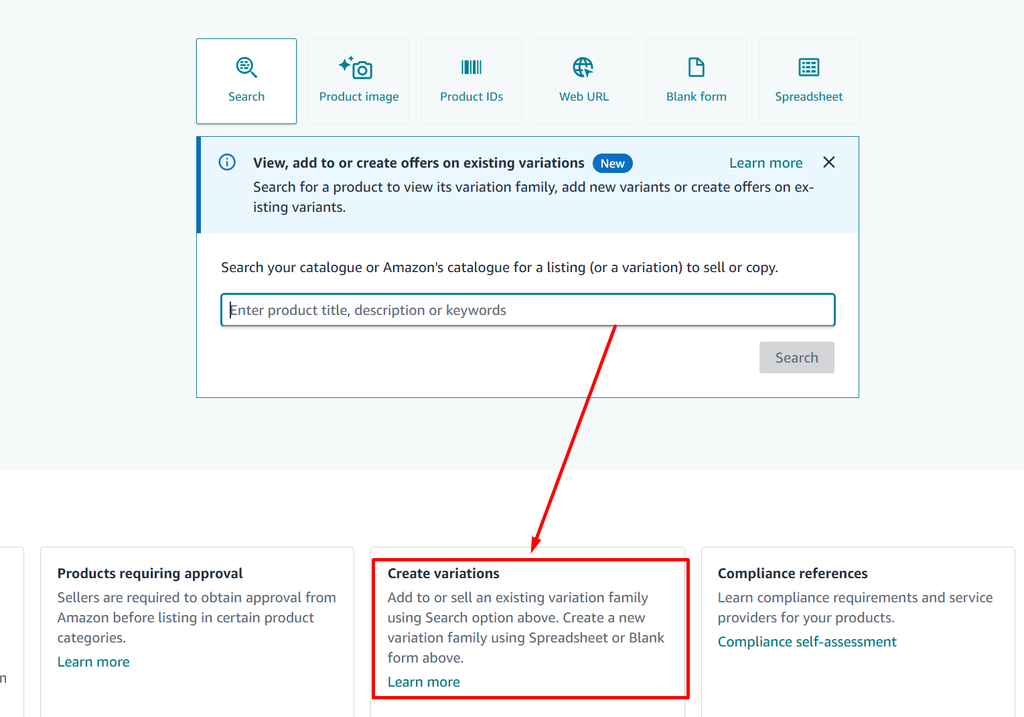
- Go to Add Products → Create Variations Using Wizard.
- Choose “Add or Update an Existing Variation Family”.
- Enter the parent ASIN, then fill in details for the new child listing.
- Download the auto-generated template, review, and re-upload to complete the process.
Option 3: Create a New Variation Family from Multiple Standalone Listings
- Download the category template for the relevant product type.
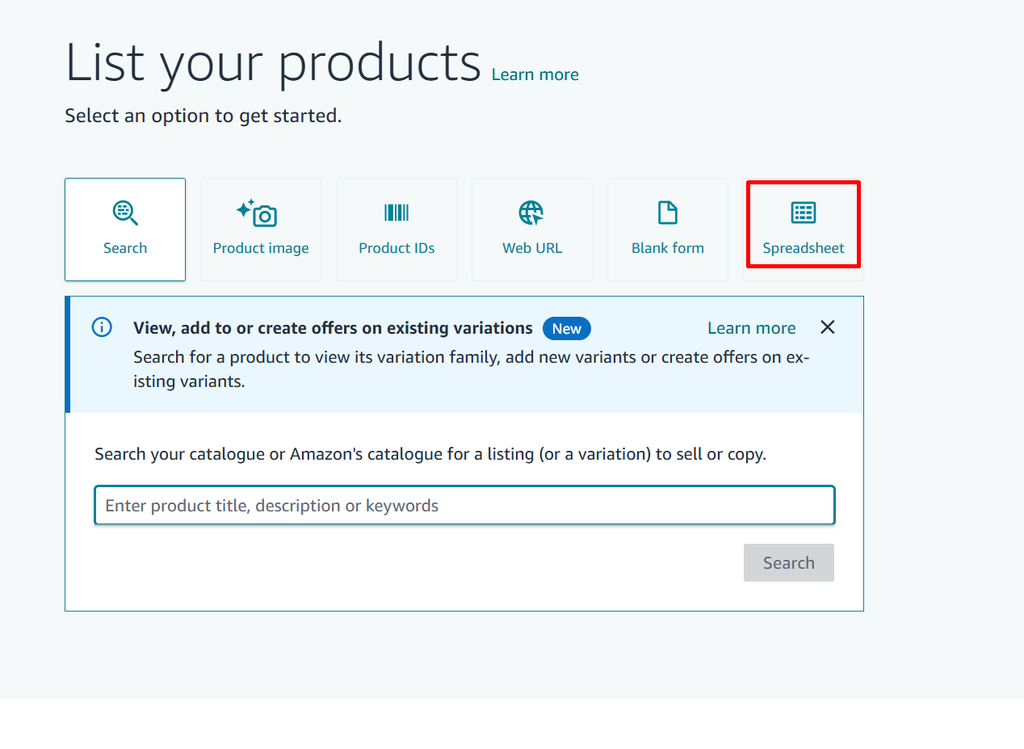
- Assign a parent SKU and map all child SKUs under it.
- Fill in variation details (size, color, relation type = parent/child).
- Upload the completed file in Seller Central.
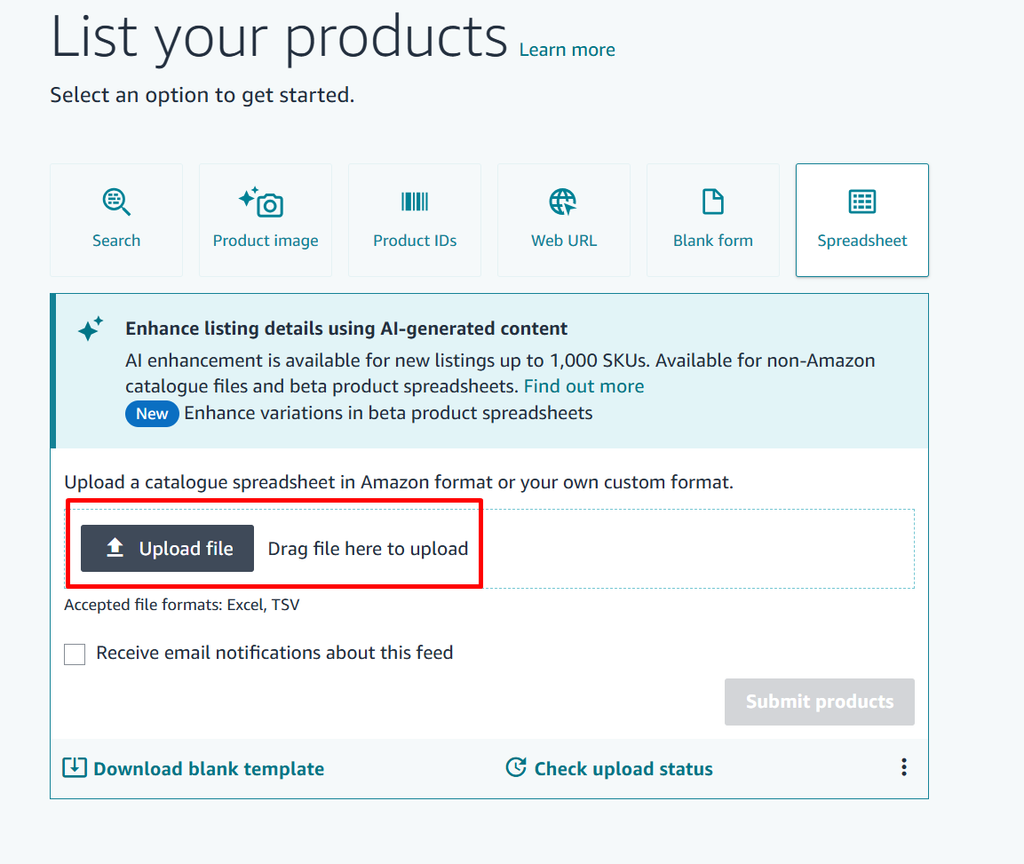
- Amazon creates a new parent-child relationship linking all standalone listings.
This option is more advanced but necessary when no parent listing exists.
Best Practices for Variation Management
Setting up variations correctly is just the beginning. Long-term success requires a clean, optimized catalog that works well for both customers and Amazon’s system. Proper barcode management, high-quality product images, and effective review consolidation can significantly improve listing performance. Following these best practices helps create a professional, organized catalog while supporting better search visibility and sales performance. For private-label sellers, getting these details right can turn a struggling listing into a strong, competitive product.
To avoid catalog issues and ensure maximum performance, follow these best practices:
- Plan variations in advance and always enable the variation box during listing creation.
- Use GS1 barcodes for each child product to maintain compliance.
- Upload unique images for every color or style to improve customer trust.
- Avoid mixing unrelated products under one parent ASIN; only true variations should be grouped.
Common Mistakes to Avoid
Variation mistakes can create serious problems for sellers, from poor customer experiences to listing suppression and policy violations. Grouping unrelated products under the same parent, reusing the same UPC across different variations, or failing to provide accurate images for each option can lead to catalog conflicts and reduced conversions. Avoiding these common errors helps keep listings compliant, organized, and easy for customers to navigate, while supporting better overall performance.
- Skipping the variation option during listing creation.
- Using one UPC for multiple variations.
- Grouping unrelated products (e.g., water bottles + yoga mats) under a single parent.
- Neglecting to update images for each variation type.
- Overwriting parent listings instead of creating proper child SKUs.
Frequently Asked Questions About Amazon Variation Listings
1. How many variations can a parent listing have?
Amazon allows up to 2,000 child SKUs under a single parent listing. However, it’s recommended to keep the number manageable (10–50 variations) for a better shopping experience and easier catalog management.
2. Does variation listing improve Amazon SEO?
Variation listings don’t directly improve indexing since most text inside images and variation names doesn’t count for ranking. However, they boost conversion rates and CTR, which signals relevance to Amazon’s algorithm and indirectly helps organic rankings.
3. Can unrelated products be added under one parent listing?
No. Amazon’s policy requires that only true variations (such as size, color, or flavor) be grouped under a parent listing. Mixing unrelated items (e.g., a yoga mat and a water bottle) can lead to listing suppression or account warnings.
4. Can variations share the same UPC?
No. Each child variation must have its own unique GS1 barcode/UPC. Using the same UPC for multiple variations can create catalog errors and compliance issues.
5. Can variations help reduce returns?
Yes. Clear variation listings with proper images, size guides, and usage details help customers make informed decisions. This reduces confusion and directly lowers return rates.
Final Thoughts
Amazon product variations can be a powerful way to improve visibility, enhance the customer experience, and support long-term sales growth. Setting up variations correctly from the beginning can save time, prevent catalog issues, and make future product expansion much easier.
Whether you are creating a new variation family, adding variations to an existing listing, or merging standalone products, following the right process is essential for maintaining a clean and scalable catalog. For brands managing complex catalogs or struggling with variation merges, expert support can make the process faster and more efficient. Experienced Amazon listing management agencies, such as ecomstack.org, can help sellers optimize their catalogs, manage variations, and build a stronger foundation for growth.