Most sellers only check their Account Health dashboard after a problem occurs, such as a suppressed listing, lost Buy Box, or account suspension. However, the warning signs are often visible much earlier.
The Account Health dashboard in Seller Central is Amazon’s real-time assessment of your account. It monitors customer service, shipping performance, and policy compliance, combining them into an Account Health Rating (AHR). This guide explains the key metrics, their thresholds, and how to identify issues early to help avoid account enforcement actions.
Table of Contents
- How to Access the Account Health Dashboard
- Understanding the Account Health Rating (AHR)
- Order Defect Rate (ODR)
- Late Shipment Rate (LSR)
- Pre-Fulfillment Cancellation Rate
- Valid Tracking Rate (VTR)
- On-Time Delivery Rate (OTDR)
- Policy Compliance
- How Often to Check the Dashboard
How to Access the Account Health Dashboard
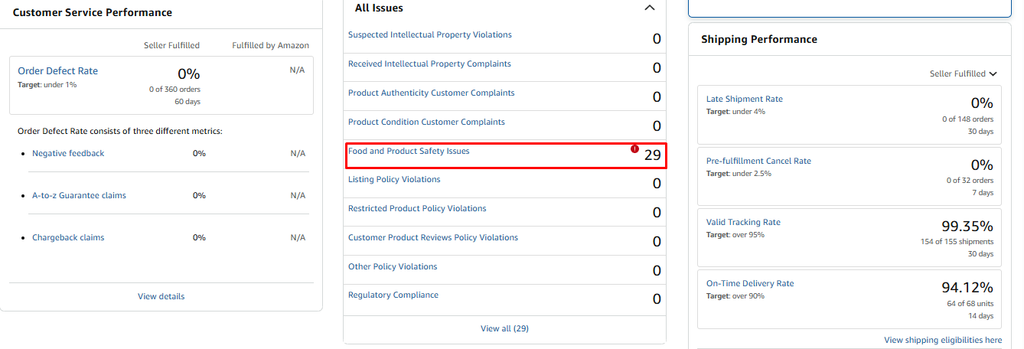
In Seller Central, go to Performance > Account Health. The dashboard opens with a summary view showing your Account Health Rating, current standing on each performance metric, and any open policy violations.

From here, two sections matter most:
- Customer Service Performance: Click into this to see your detailed Order Defect Rate report, including a breakdown of negative feedback, A-to-Z claims, and chargebacks.
- Policy Compliance: This is a separate section from your performance metrics. It lists intellectual property complaints, product authenticity issues, restricted product warnings, and other policy violations. Both sections feed into your overall AHR, but many sellers only check the performance metrics and miss policy warnings building up here.
Understanding the Account Health Rating (AHR)
The AHR is a composite score, shown with a color-coded status, that summarizes your account’s overall risk level. It combines your performance metrics (ODR, LSR, cancellation rate, VTR, OTDR) with your policy compliance record into one number.
A higher rating means a healthier account. A lower rating means Amazon considers the account at higher risk of enforcement action, which can include listing removals, loss of Buy Box eligibility, or full suspension.

Order Defect Rate (ODR)
ODR is the single most consequential metric on the dashboard. It measures the percentage of your orders that have a defect, defined as any of the following:
- A negative customer review (1 or 2 stars)
- An A-to-Z Guarantee claim filed by a buyer
- A credit card chargeback
If a single order has more than one of these issues, it still only counts as one defective order.
Threshold: Amazon wants ODR below 1%. At 2,000 orders per month, that means no more than 20 defective orders. A safer internal target is to stay below 0.5%, since exceeding 1% can mean losing Buy Box eligibility for up to 60 days.
Category context matters. Apparel sellers often deal with 20 to 30% return rates, which puts much more pressure on ODR than categories like books (2 to 5%) or home goods (5 to 10%). If you sell in a high-return category, build extra buffer into your internal targets.
How to improve it:
- Respond to negative reviews and resolve the underlying issue, not just the review itself
- Investigate every A-to-Z claim to find the root cause: wrong item, damaged in transit, late delivery
- Review chargebacks for patterns, such as a specific product or shipping method causing repeat issues
Late Shipment Rate (LSR)
LSR tracks the percentage of orders shipped after their expected ship date, calculated over a 10-day or 30-day period depending on the report.
Threshold: Amazon generally wants this under 4%, but a safer internal target is under 2%.
Important detail: LSR is calculated based on when you confirm shipment in Seller Central, not when the carrier actually picks up the package. If you confirm shipment a day late even though the package was ready on time, it still counts as late.
How to improve it:
- Set handling times that account for worst-case scenarios, not best-case
- Confirm shipment as soon as the package is ready for pickup, not after the carrier collects it
- If you use FBA for any portion of your catalog, those orders get automatic perfect shipping metrics, which can help offset FBM shipping issues elsewhere in your account
Pre-Fulfillment Cancellation Rate
This measures the percentage of orders you cancel before shipment, calculated over a 7-day period. It only counts cancellations initiated by you as the seller, not by the buyer.
Threshold: Amazon generally wants this under 2.5%, with a safer internal target around 1%.
High cancellation rates signal inventory management problems to Amazon. If you are frequently cancelling orders because an item is out of stock, Amazon sees this as a sign that your listed inventory does not match your actual stock.
How to improve it:
- Sync your inventory management system with Seller Central in real time if you sell across multiple channels
- Build in a small buffer between your listed quantity and your actual stock to avoid overselling during high-demand periods
- If a product is consistently going out of stock, consider setting it to inactive proactively rather than risking a cancellation
Valid Tracking Rate (VTR)
VTR measures the percentage of your shipments that have valid, trackable tracking numbers uploaded to Amazon.
Threshold: Amazon wants this above 95%, with Premium Shipping eligibility requiring 99%.
| VTR was expanded in January 2025 to cover all shipping carriers, not just Amazon-integrated ones.If you previously used a regional or local carrier that was not Amazon-integrated and assumed it did not count toward VTR, that is no longer the case. |
How to improve it:
- Use carriers that are integrated with Amazon’s tracking system wherever possible
- If you must use a non-integrated carrier, manually enter the tracking number and carrier name in Seller Central for every shipment
- Use Buy Shipping through Amazon when available, since this automatically uploads valid tracking
On-Time Delivery Rate (OTDR)
OTDR measures how reliably your orders arrive within the delivery window promised to the customer at checkout.
Threshold: Amazon generally wants this above 95%, with Premium Shipping eligibility requiring 97%.
A high OTDR reflects directly on customer experience and is one of the clearer signals Amazon uses to assess whether your fulfillment process is reliable end to end, not just whether you shipped on time.
How to improve it:
- Choose shipping speeds and carriers that realistically match your promised delivery windows, especially for remote delivery areas
- Avoid promising delivery windows that depend on best-case carrier performance
- Monitor delivery performance by carrier and route, and adjust your shipping settings for routes that consistently run late
Policy Compliance
This section is separate from your performance metrics but feeds into the same overall AHR. It covers:
- Intellectual property complaints: Claims from rights owners that your listing infringes a trademark, copyright, or patent
- Product authenticity complaints: Claims that the product you sold is not genuine
- Restricted product warnings: Listings that violate category-specific restrictions, such as selling a product that requires approval you do not have
Why this section is often overlooked: ODR, LSR, and cancellation rate live in the performance metrics part of the dashboard. Policy compliance is a separate section, and many sellers check one without the other. Both sections contribute to your AHR, so ignoring policy warnings because your performance metrics look healthy is a common and costly mistake.
An important pattern for new listings: Amazon’s compliance systems do not typically flag new ASINs immediately at launch. The most active period for compliance reviews is the first 30 to 90 days after a listing goes live. By the time a warning appears, the listing may already have reviews and sales history, making it harder to fix cleanly. Build a compliance check into your listing launch process rather than waiting for a warning.
How Often to Check the Dashboard
The Account Health dashboard is not something to check only when you get a notification email. Build it into a recurring routine.
- Weekly: Review your overall AHR, check each performance metric against its threshold, and look for any new policy warnings. If a metric is trending upward even if still within threshold, investigate the cause immediately rather than waiting for it to cross the line.
- Monthly: Run a structured audit of your catalog. Check that listings follow current category rules, that variations and attributes match what buyers actually receive, and that no listings have accumulated new compliance flags since your last review.
| Set internal alert thresholds below Amazon’s actual thresholds, typically around 50% of Amazon’s limit.For example, if Amazon’s ODR threshold is 1%, set your internal alert at 0.5%. This buffer shrinks faster than expected during high-volume periods like Q4. |
The Account Health dashboard exists to give you an early warning system. Every metric on it is something Amazon is already measuring whether you look at it or not. The only choice is whether you find out about a problem this week, while it is still a number on a dashboard, or a few weeks from now, when it has become a suppressed listing or a suspension notice.
Have questions about a specific metric or an account health issue you are currently dealing with? Leave a comment below.