A great eBay listing does two things at once. It ranks well in Cassini, eBay’s search algorithm, so the right buyers find it. And it converts once a buyer lands on it, so they actually make a purchase. Most sellers focus on one and neglect the other. This guide covers both.
Table of Contents
- How Cassini Works
- Step 1: Keyword Research
- Step 2: Title Optimization
- Step 3: Item Specifics
- Step 4: Product Description
- Step 5: Product Images
- Step 6: Pricing
- Step 7: Shipping and Returns
- Step 8: Seller Performance
- Step 9: Promoted Listings
How Cassini Works
Cassini is eBay’s search engine and it decides which listings appear when a buyer searches, and in what order. Understanding how Cassini ranks listings is the foundation of everything else in this guide.
Cassini weighs three main pillars:
- Relevance (40 to 50%): How closely your title, item specifics, and category match what the buyer searched for. If the searched word is not in your title, your listing does not even enter the candidate pool.
- Seller Performance (30 to 40%): Your feedback score, defect rate, late shipment rate, and how quickly you respond to buyers.
- Listing Quality (20 to 30%): Professional photos, a complete description, competitive pricing, and a positive sales history.
Step 1: Keyword Research
Before writing your title or description, identify the exact search terms your target buyers are using. This is where most sellers skip ahead and pay for it later.
- eBay autocomplete: Type your product into the eBay search bar and note the suggestions. These reflect real, high-volume buyer searches.
- Competitor titles: Look at the top five listings for your product and note which keywords appear in all of them. These are the terms Cassini associates with high relevance for that product type.
- Terapeak: eBay’s own research tool, available free inside Seller Hub. Shows search volume, sell-through rates, and average sale prices for specific terms.
- eBay filters: Browse your category and look at the filter options on the left sidebar. These filter labels are often the exact item specific terms buyers use when searching.
Once you have your list, prioritize by search volume and relevance. Your highest-priority keywords go in the title. Supporting terms go in item specifics and description.
Step 2: Title Optimization
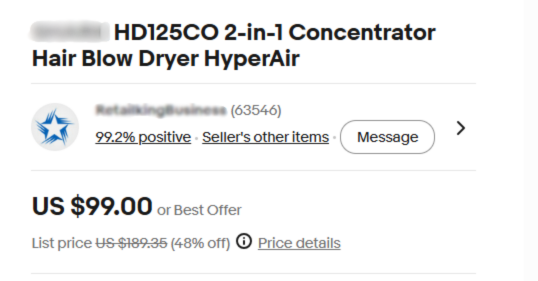
Your title is the single most important field in your listing. Cassini matches buyer queries against the title first, before looking at anything else. If a buyer’s search term is not in your title, your listing will not appear for that search regardless of how good everything else is.
Character Limit: 80 characters
eBay allows exactly 80 characters for listing titles. Use 70 to 80 of them. Every unused character is wasted ranking capacity.
| Title structure: Brand + Model or Product Type + Key Features + Condition + Specs |
Title rules
- Put your most important keyword as early in the title as possible
- Include brand, model number, size, color, material, and condition where relevant
- Use the words buyers actually search for, not marketing language
- Do not use filler words like WOW, L@@K, or LOOK. Cassini ignores them and they waste characters.
- Do not use excessive punctuation or symbols
- Do not keyword stuff. Cassini detects unnatural keyword lists and can penalize the listing.
Step 3: Item Specifics
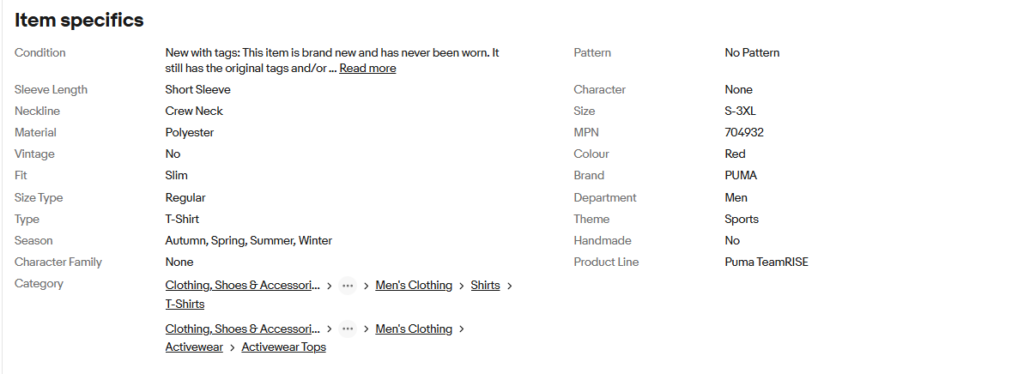
Item specifics are one of the most underused and most impactful fields in any eBay listing. They are the structured attributes like brand, color, size, material, and model number that eBay displays in filters on the left side of search results.
When a buyer filters search results by brand or size, only listings with those item specifics filled in appear. If your item specifics are empty or incomplete, your listing is invisible to filtered searches, which accounts for a significant portion of eBay traffic.
- Fill every relevant item specific, not just the required ones. eBay marks some as required and others as recommended. Fill both.
- Use the exact values eBay suggests where available. Custom values may not match how buyers filter.
- Each item specific value is limited to 65 characters. Custom specific names are limited to 40 characters.
- For products with multiple variations such as size or color, set up variation listings rather than separate listings. This consolidates your sales history into one listing, which improves Cassini ranking over time.
| Cassini uses item specifics to match listings to filtered searches.A listing without complete item specifics can rank well for a general search but be completely invisible when a buyer applies a filter. |
Step 4: Product Description
Most buyers on eBay do not read the full description. They scan the title and images, check the price and shipping, and then decide. But the description still matters for three reasons: it gives Cassini additional keyword context, it answers specific questions for buyers who do read it, and it reduces disputes by setting clear expectations.
What to include
- A brief, clear overview of what the product is and its condition
- Key specifications: dimensions, weight, compatibility, materials
- What is included in the listing: any accessories, packaging, or extras
- Condition details: for used items, be specific about any wear, scratches, or missing parts
- Any relevant compatibility information, for example which devices or models the product works with
How to write it
Keep paragraphs short. Most eBay browsing happens on mobile and long blocks of text get skipped entirely. Two to three sentences per paragraph is enough. Use plain, direct language. Avoid marketing fluff or excessive capitals.
Step 5: Product Images
Images are what converts a shopper into a buyer. A buyer cannot touch your product, so your images need to show exactly what they are getting.
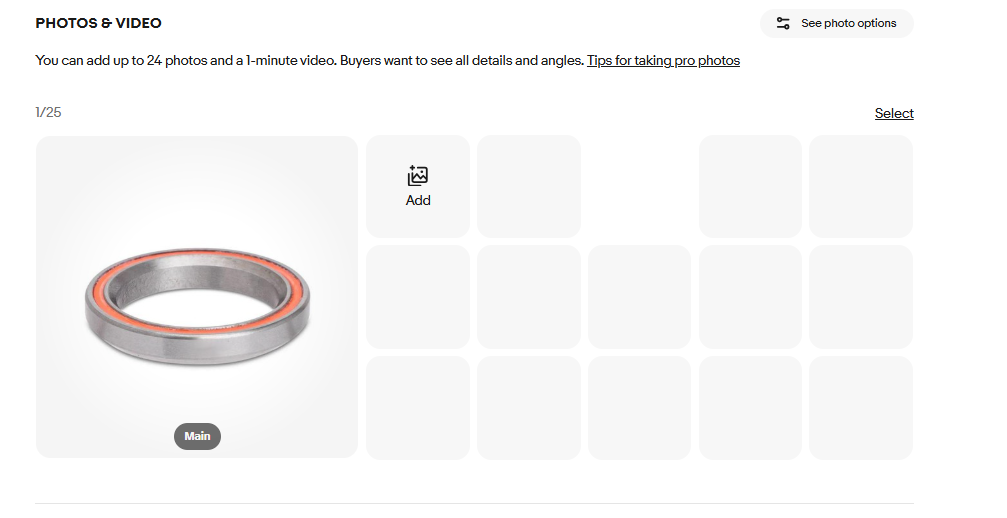
Image Allowance: Up to 24 photos per listing, all free
eBay increased the free photo limit to 24. Use as many as your product warrants. More angles mean fewer return requests.
Main image requirements
- White or neutral background is strongly recommended for the main image
- Minimum 500px on the longest side. At least 1600px recommended to enable zoom.
- No watermarks, borders, or text overlays on the main image
- The product should fill most of the frame
Additional images
- All angles: front, back, sides, top, and bottom where relevant
- Close-ups of any wear, damage, or notable details for used items
- Contents of the box: show exactly what a buyer receives
Step 6: Pricing
Cassini factors price competitiveness into its ranking. A listing priced significantly higher than comparable sold items will rank lower than a competitively priced one, even if everything else is equal.
Before setting a price, research completed and sold listings for your exact product. In Seller Hub, search for your item and filter by Sold Listings. This shows what buyers have actually paid recently, which is more useful than what other sellers are currently asking.
- Use the Buy It Now format for most products. Auctions can work for rare or highly sought-after items, but Buy It Now gives Cassini more stable performance data to work with.
- Use psychological pricing where appropriate. Prices ending in .99 or .95 consistently outperform round numbers in conversion rate tests.
- Factor in eBay’s final value fee (typically 12 to 15% depending on category), PayPal or managed payments processing, and shipping costs before setting your floor price.
- If you offer free shipping, build the cost into your item price. Listings with free shipping rank higher in Cassini and convert better with buyers.
Step 7: Shipping and Returns
Shipping speed and policy are direct Cassini ranking signals. Listings with fast, reliable shipping and a buyer-friendly returns policy consistently outperform those without.
Shipping
- Offer free shipping if your margins allow. Listings with free shipping get a visibility boost in Cassini and are preferred by most buyers.
- Set a handling time of one business day if possible. Cassini rewards fast dispatch and it is a requirement for Top Rated Seller status.
- Offer at least one tracked shipping option. Carrier-validated tracking improves your seller metrics and protects against item not received claims.
Returns
- Offering a 30-day return policy is the minimum for Top Rated Seller status. A 60-day policy is preferred.
- Listings with a return policy consistently convert better than those without because buyers feel less exposed to risk.
- For used items, write a clear returns policy in your description that specifies the condition criteria for returns.
Step 8: Seller Performance
Your seller metrics directly affect how Cassini ranks all of your listings. Poor performance scores drag down your entire account’s visibility, not just the listings with issues.
eBay’s Top Rated Seller benchmarks in 2026:
- Transaction defect rate: 0.5% or lower, with three or fewer defects from unique buyers
- Cases closed without seller resolution: 0.3% or lower, with two or fewer cases
- Late shipment rate: 3% or lower, with five or fewer late shipments
- Tracking uploaded within handling time: 95% of transactions or higher
How to protect your performance metrics:
- Respond to buyer messages within 24 hours, ideally same day
- Ship within your stated handling time every time, not most of the time
- Describe item condition accurately to avoid returns and disputes
- Check your Seller Dashboard in Seller Hub weekly for any emerging issues
| Top Rated Sellers receive a 10% discount on final value fees and a Top Rated Plus badge on listings.The badge appears in search results and has a measurable positive impact on click-through rate. |
Step 9: Promoted Listings
Promoted Listings is eBay’s paid advertising program that places your listings in more prominent positions in search results. Unlike traditional ads, you only pay when a buyer clicks your promoted listing and purchases within 30 days.
When to use Promoted Listings
- New listings with no sales history. Cassini ranks new listings lower until they have performance data. Promoted Listings gives them immediate visibility while organic rank builds.
- Seasonal or event-driven items where timing matters: holiday products, back to school items, sports gear tied to a season.
- High-margin products where the ad cost as a percentage of sale price is acceptable.
How to set ad rates
eBay suggests an ad rate based on your category. The suggested rate is a reasonable starting point. Monitor your Promoted Listings dashboard in Seller Hub weekly and adjust based on impressions, clicks, and sales conversion. Do not set and forget.
| Do not promote every listing at the same rate.Focus your ad spend on your best-margin products and your new listings that need initial visibility. |