Most sellers spend their entire content budget polishing individual product listings and never touch the one section that shows up on every single one of them automatically. The Brand Story module sits between your bullet points and your A+ Content, and unlike everything else on the page, you build it once and it appears across your entire catalog. Few sellers use it well, which makes it one of the easiest places left on Amazon to stand out.
This guide covers exactly what the Brand Story module is, how it differs from A+ Content, who qualifies, how to set it up step by step, and what separates a Brand Story that actually drives trust from one that just takes up space.
Table of Contents
- What Is the Brand Story Module?
- Brand Story vs A+ Content: What’s the Difference
- Eligibility Requirements
- Step-by-Step: How to Create Your Brand Story
- The Modules You Can Use
- What Makes a Brand Story Actually Work
- Common Mistakes to Avoid
- Why This Matters More
What Is the Brand Story Module?
The Brand Story module is a horizontal, carousel-style content block that Amazon places between your bullet points and your A+ Content on every product detail page. It is designed specifically for brand storytelling rather than product specifications, giving you space to share your mission, introduce your founder, highlight other products in your catalog, and build the kind of trust that a list of bullet points cannot.
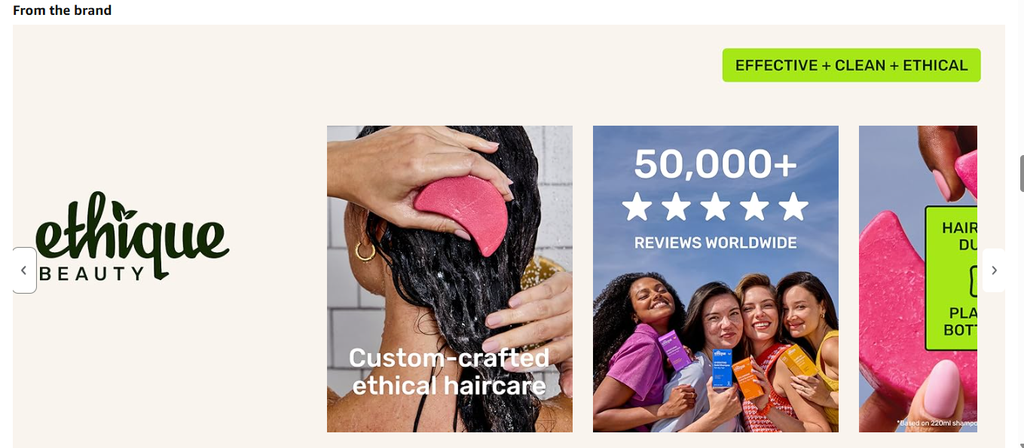
The single biggest advantage of the Brand Story module is that you build it once and it automatically appears on every product listing under your brand. You are not recreating it for each ASIN the way you would with standard A+ Content. Set it up correctly and every product in your catalog benefits from the same trust-building content and cross-sell opportunity without any extra work per listing.
Brand Story vs A+ Content: What’s the Difference
These two often get confused, but they serve different jobs on the page and understanding the difference shapes how you should approach each one.
- Brand Story is reused across your entire catalog. It is brand-focused, not product-focused, and its main job is building trust and encouraging shoppers to explore more of your catalog.
- A+ Content is built per ASIN. It is product-focused, used to explain features, answer specific questions about that exact product, and support the purchase decision for that one listing.
Think of Brand Story as your introduction and A+ Content as your evidence. A shopper who lands on your product page gets the brand context once, near the top, then the specific product details further down. Both require Brand Registry, and both work best when they reinforce each other rather than repeating the same content.
Eligibility Requirements
Not every seller has access to this module automatically. To qualify, you need:
- Enrollment in Amazon Brand Registry
- An active registered trademark for your brand
- A Professional Selling account with a suitable brand role, such as Brand Representative
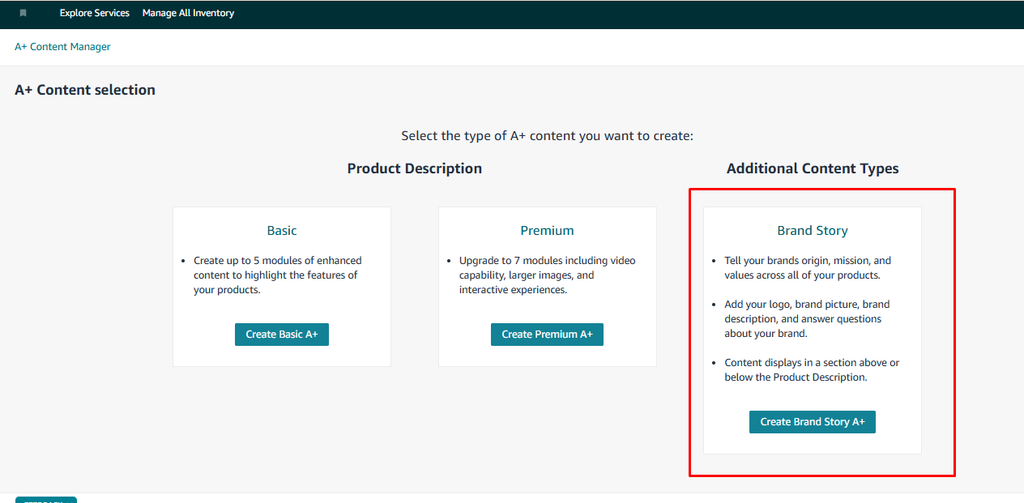
If you meet these requirements, the Brand Story module is available inside your A+ Content Manager. There is also a separate, stricter eligibility tier worth knowing about: Premium A+ Content (sometimes called A++), which unlocks video, interactive hotspots, and carousel modules. Many brands now gain access to it automatically through Brand Registry, but Amazon has historically gated it behind two specific requirements: a Brand Story published across every listing in your catalog, plus at least five approved standard A+ Content submissions within the trailing 12 months. Since Amazon adjusts these thresholds periodically without much notice, check your A+ Content Manager directly. If you see a Premium option when creating new content, you already have access.
Step-by-Step: How to Create Your Brand Story
- Log in to Amazon Seller Central.
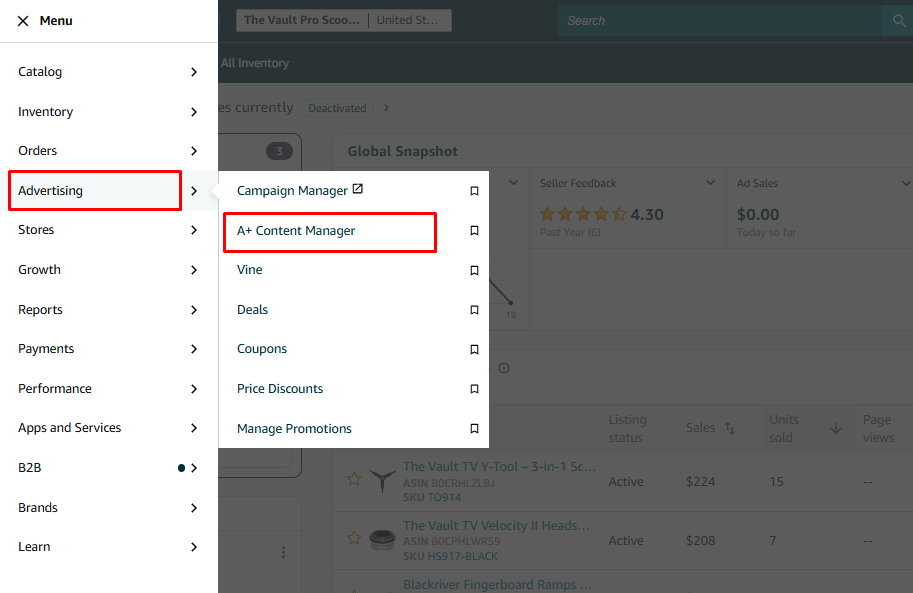
- Click the hamburger menu in the top-left corner and navigate to Advertising.
- Select A+ Content Manager.

- Inside the A+ Content Manager, locate the Brand Story option.
- Click Create Brand Story, then choose the modules you want to include.
- Add your images, text, and links for each module, following Amazon’s image and character guidelines for each module type.
- Preview the full Brand Story exactly as it will appear on your live listings.
- Submit it for Amazon’s review. Once approved, it publishes automatically across every eligible ASIN in your brand catalog.
The Modules You Can Use
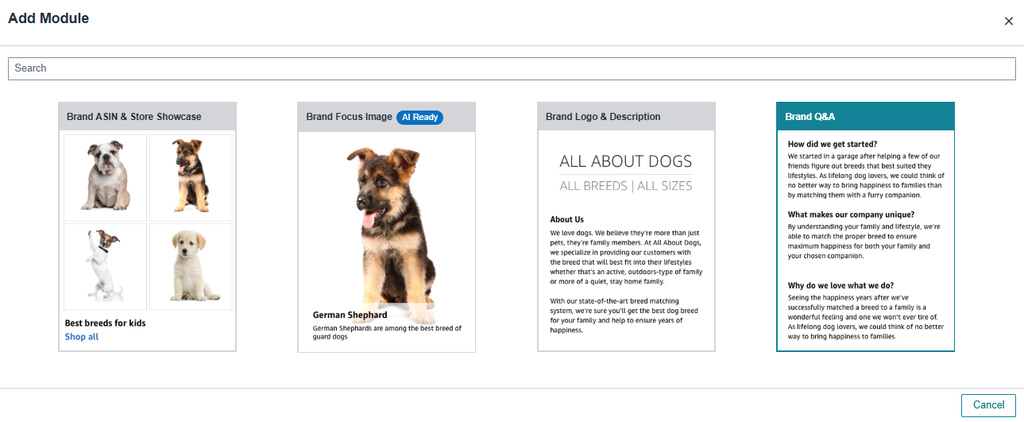
Amazon provides several module types specifically for Brand Story, each suited to a different part of your brand’s narrative.
- Brand Logo and Description: Your visual introduction. Use this to state your mission in a sentence or two and establish what the brand is about before anything else.
- Brand Focus Image: A single high-impact visual section. This is one of the most underused modules, despite being one of the easiest places to make a strong first impression.
- Store Showcase / Brand As Seen: Designed for cross-selling. Feature multiple products from across your catalog here, encouraging shoppers to explore beyond the one listing they landed on.
- Brand Q&A: Frequently skipped, but effective when used well. Amazon provides built-in prompts like “How did we get started?” and “What makes us different?” which are genuinely useful starting points for building an emotional connection rather than just listing facts.
Since this content appears on every listing under your brand, write it to feel relevant across your entire catalog, not just the one product you happened to be thinking about while building it. A Brand Story that only makes sense next to one specific item will feel out of place, even confusing, on everything else.
What Makes a Brand Story Actually Work
The single biggest mistake sellers make with Brand Story is treating it as a place to restate product features. That space is already covered by your bullets and A+ Content. Brand Story has one job: answer the question every new shopper is silently asking, why should I trust this brand over the others on this page?
A Brand Story that works does a few specific things:
- It leads with the brand’s mission or founding story rather than a product pitch, since that is the content nowhere else on the page provides.
- It uses real specifics, a founder’s name, an actual reason the brand started, a concrete sustainability practice, rather than generic language that could apply to any seller.
- It uses the Store Showcase module deliberately, not as filler, picking products that genuinely complement what the shopper is already looking at.
- It stays consistent enough to make sense across every product in the catalog, since the same content will appear next to all of them.
Common Mistakes to Avoid
- Treating Brand Story as a second product description. It is positioned for brand trust, not feature lists. Repeating bullet point content here wastes the space.
- Writing content that only fits one product. Since Brand Story appears everywhere, content that makes sense for one item but feels disconnected from the rest of your catalog creates confusion rather than trust.
- Leaving the Brand Q&A module empty or generic. This is one of the most effective modules for emotional connection when filled in with real specifics, and one of the most commonly skipped.
- Never updating it after the first publish. A Brand Story that goes live once and is never revisited misses opportunities to highlight new products, seasonal messaging, or updated brand achievements.
- Underusing the Brand Focus Image. This module gets the least attention from sellers despite offering some of the highest visual impact on the page.
Why This Matters More
Two things have changed the calculus on Brand Story specifically this year. First, it has become one of the prerequisites for unlocking Premium A+ Content for many brands, meaning skipping it does not just cost you trust signals on your listing, it can gate you out of more advanced content tools entirely. Second, brands using a complete content strategy, A+ Content plus a properly built Brand Story, continue to show measurably better conversion and lower return rates than brands relying on bullets and a basic description alone.
With shoppers increasingly comparing multiple similar listings before buying, and with Amazon’s own AI tools reading brand and product content more closely than ever to decide what to recommend, a Brand Story that clearly communicates who you are and why you are credible has become less of a nice-to-have and more of a baseline expectation for any brand serious about its Amazon presence.