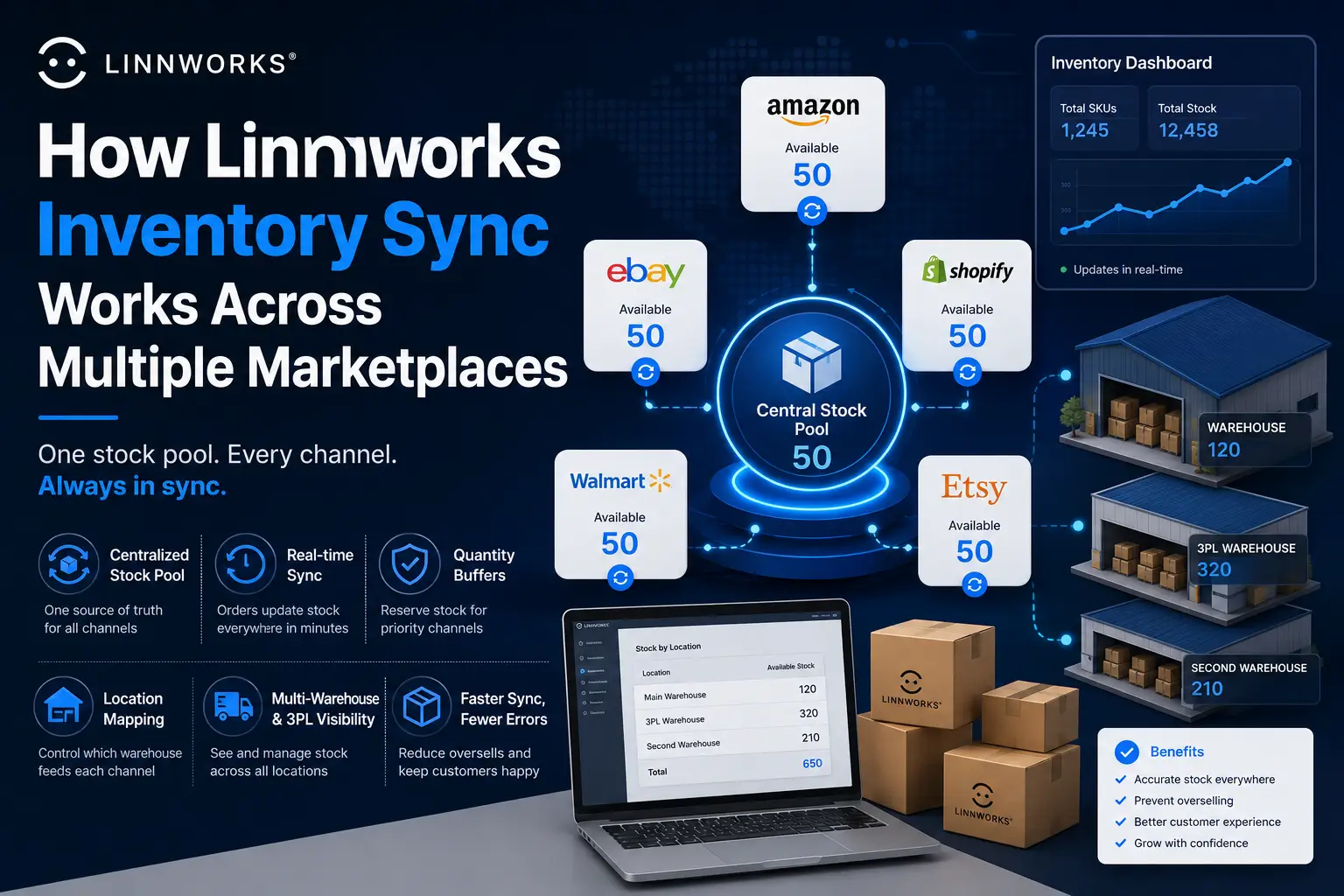
The core promise of Linnworks is simple to state: sell the same product on five marketplaces, and the stock count stays accurate everywhere, automatically. The mechanics behind that promise are less simple, and understanding them is what separates sellers who trust their stock numbers from those who keep discovering oversells after the fact.
This guide explains exactly how inventory sync works once you have multiple channels connected to Linnworks, including how stock gets allocated across channels, what buffers and quantity rules actually do, how multi-warehouse setups affect the numbers, and where sync commonly breaks down.
Table of Contents
- The Core Concept: One Stock Pool, Many Channels
- How a Sale Updates Stock Everywhere Else
- Quantity Buffers: Controlling What Each Channel Sees
- Location Mapping: Which Warehouse Feeds Which Channel
- Multi-Warehouse and 3PL Inventory Visibility
- Composite Items and Bundles Across Channels
- Sync Speed and Timing
- What Can Break the Sync
The Core Concept: One Stock Pool, Many Channels
Without Linnworks, each marketplace you sell on holds its own separate stock count. If you have 50 units of a product, you might list 50 on Amazon, 50 on eBay, and 50 on Shopify, each completely unaware of the others. The moment you sell 10 units on Amazon, your eBay and Shopify listings are now wrong by 10 units until someone manually updates them.
Linnworks replaces this with a single, central stock count per SKU. Every connected channel reads from and writes to this one number, instead of holding its own independent count. So with 50 actual units, all three channels show 50 available, and the moment any one of them sells a unit, the master count drops to 49 and every other connected channel reflects that change.

This is the foundational mechanic that makes overselling largely preventable. The marketplaces are not actually talking to each other directly. They are all talking to Linnworks, and Linnworks is the single source of truth they each check against.
How a Sale Updates Stock Everywhere Else
When a customer buys a product on any connected channel, the sequence looks like this:
- The order is placed on the marketplace (say, Amazon).
- Linnworks imports that order, based on your configured import frequency for that channel.
- Linnworks deducts the sold quantity from the central stock count for that SKU.
- Linnworks pushes the new, lower stock count out to every other connected channel selling that same SKU.
- Each channel updates its own displayed stock level to match.
The entire cycle, from order placed to stock updated everywhere else, typically happens within minutes, not hours, which is what allows Linnworks to describe this as real-time or near-real-time syncing.
| Important nuance: the speed of importing the order depends on each channel’s own order import settings.If you have set a channel to import orders every 30 minutes rather than continuously, there is a window where a sale has happened but Linnworks has not yet processed it, meaning other channels are technically still showing slightly stale stock during that window. |
Quantity Buffers: Controlling What Each Channel Sees
A buffer is a quantity you hold back from being shown as available on a specific channel, even though it physically exists in your stock count. Buffers exist because not every channel should necessarily show the exact same number as your true stock.
Example of how this is used in practice: if you have 20 units of a product and want to guarantee that your highest-margin channel, say your own Shopify store, never runs out even if a marketplace order surges, you might set a 5-unit buffer on a lower-priority marketplace channel. That channel will then only ever show a maximum of 15 as available, protecting the remaining 5 for other channels.
Buffers are set per channel, not globally, so you can apply different buffer logic to each marketplace based on its priority, return rate, or how reliable its order volume tends to be.
Why this matters for fast-moving products: products with high order velocity benefit most from buffers, since a sudden multi-unit order on one channel can otherwise wipe out stock before Linnworks has a chance to sync the new count to every other channel during a brief processing window.
Location Mapping: Which Warehouse Feeds Which Channel
If you operate more than one warehouse location, whether that is your own facility plus a 3PL, or multiple physical sites, you need to tell Linnworks which locations are allowed to supply stock to which channels. This is configured separately from the buffer settings, under each channel’s Location Mapping screen.
By default, Linnworks combines stock across every location you have ticked and reports that combined total to the channel. If you want a specific channel to only draw from a specific warehouse, perhaps because that channel’s orders are fulfilled exclusively from one site, you restrict the mapping to just that location.

This setup directly affects what available stock means for that channel. A product might show 100 units physically in stock across two warehouses, but if a channel is only mapped to one of those locations holding 40 units, that channel will only ever show 40 as available, not 100.
Multi-Warehouse and 3PL Inventory Visibility
For sellers running fulfillment across multiple physical locations, Linnworks provides one unified view of stock across every connected warehouse, including third-party logistics providers, at the same time. This means you are not logging into a separate system to check what is sitting at your 3PL versus what is in your own facility.
Linnworks also tracks inventory transfers between locations through every stage of the journey, from the moment stock is removed at the origin warehouse, through transit, to the point it is received at the destination. This matters for sync accuracy specifically because stock that is in transit between locations is in a different state than stock that is sitting ready to ship, and the system needs to account for that difference so channels are not shown stock that is technically unavailable mid-transfer.
Composite Items and Bundles Across Channels
If you sell bundles, kits, or multi-packs, where one listed product is actually made up of several individual stocked items, Linnworks handles this through composite items. A composite item is linked to a single SKU for selling purposes, but on the backend, selling one unit of the bundle automatically deducts the correct quantity from each individual component’s stock count.
This matters for multi-marketplace sync specifically because the components inside a bundle are often also sold individually on other listings. If a bundle and a standalone product share a component, selling either one correctly reduces the shared component’s stock, which then correctly reduces the maximum number of bundles that can still be sold, even on a completely different channel than where the component sale happened.
Sync Speed and Timing
Linnworks markets its inventory sync as real-time, and for most order volumes this holds up well in practice, with updates typically completing within minutes of an order being placed. That said, a few factors affect how quickly a specific channel reflects a change:
- Order import frequency per channel: some integrations check for new orders continuously, others on a set interval. A longer interval means a longer window before that channel’s sale is reflected in the central stock count.
- Channel-side processing delays: even after Linnworks pushes an updated stock number out, the marketplace itself needs to process and display that update, which is occasionally subject to that platform’s own systems and API rate limits.
- Volume and timing of bulk updates: if you make a large bulk stock adjustment, for example after a stock count or a large incoming shipment, that change needs to propagate across every connected channel, which can take longer than a single-unit sale-driven update.
What Can Break the Sync
Even with everything configured correctly, a few specific situations commonly cause stock numbers to drift out of sync:
- A SKU mismatch on one channel. If a product’s SKU on a specific marketplace does not exactly match the SKU in Linnworks, that specific listing is effectively invisible to the sync process. It will not update even though every other channel for that same product updates correctly.
- An unmapped or incorrectly mapped warehouse location. If a channel is not correctly mapped to the location actually holding the stock, it may show zero or an incorrect quantity regardless of true inventory.
- Manual stock edits made directly on a marketplace. If you log into a marketplace’s own seller dashboard and manually change a stock number there instead of in Linnworks, that channel’s number will be temporarily correct on the marketplace side but inconsistent with Linnworks’ own record, and the next sync cycle may overwrite your manual change.
- A channel integration that has lost authorization. If a channel’s connection token has expired or needs re-authorization (a common occurrence with eBay specifically), Linnworks can no longer push updates to that channel until the connection is restored, even though everything continues syncing correctly across your other channels.
| The practical takeaway: treat Linnworks as the single place where stock numbers are changed.Any manual override made directly on a marketplace, or any SKU inconsistency introduced when adding a new listing, creates a gap between what Linnworks believes is true and what the channel is actually showing, and that gap is where oversells happen. |
Understanding how the sync actually works, not just trusting that it works, is what lets you set it up correctly the first time and diagnose problems quickly when something looks off. The pattern across nearly every sync issue is the same: a SKU that does not match, a location that is not mapped, or a channel connection that needs renewing. Once those three things are solid, the real-time sync genuinely does what it promises.
Have questions about a specific multi-warehouse setup or a stock discrepancy you are seeing? Leave a comment below.